
25.02% of top-ranking pages have no meta description at all, according to Ahrefs' SEO statistics study published in 2023. A quarter of the pages winning the hardest queries never wrote one, and they rank anyway. That figure settles the first question before any others: the tag isn't what lifts a page, because plenty of pages lift without it.
What it touches instead is the moment of choice. Of everything on a page, the description is what a searcher reads in the result list, under a title they've already scanned. It shapes what they understand about the page and whether they pick it over the result above and the one below.
Meta description SEO is therefore a discipline of evidence rather than belief. The research splits into two halves: what the tag does in search results, and what controlled tests show it does to clicks. Those halves don't tell the same story, and the gap between them is where the practical decisions live.
Table of Contents
- What a Meta Description Does in Search Results
- How Often Google Shows Your Description as Written
- What Click Tests Show and How to Run Your Own
- How to Write a Description for Each Page Type
- Using AI Drafts Without Losing Accuracy
- Check Your Descriptions Before You Publish
What a Meta Description Does in Search Results
A meta description is a short summary of a page, held in the HTML, that a search engine may print beneath the title of a result. The answer to know first is that it is not a ranking signal. In its 2009 statement on meta tags, Google said on 21 September 2009 that the keywords tag played no part in web ranking, and clarified that the description tag wasn't used for ranking either, though the description could still supply the text shown in a result. That position hasn't moved since.
What it does affect is the preview. That preview is the only part of the page a searcher reads before deciding, so the description's job is communication, not positioning.
| Element | Affects ranking | Supplies snippet text | Seen by searchers |
|---|---|---|---|
| Meta description | No direct effect | Yes, as a candidate when it fits the query | Yes, when Google uses it |
| Visible page content | Yes | Yes, usually the main source | Yes, when Google uses it |
| Title tag | Yes | Often shown as the result headline | Yes |
| Meta keywords tag | No | No | No |
Separating those two jobs is the whole discipline. A shop window makes the comparison exact: the description is the sign in the window that decides whether someone walks in; it is not the rule that decides where the shop sits on the street. Confusing the two produces the wrong work, such as packing a keyword into a tag that carries no ranking weight while the page body stays thin.
Here is that split as a concept map.
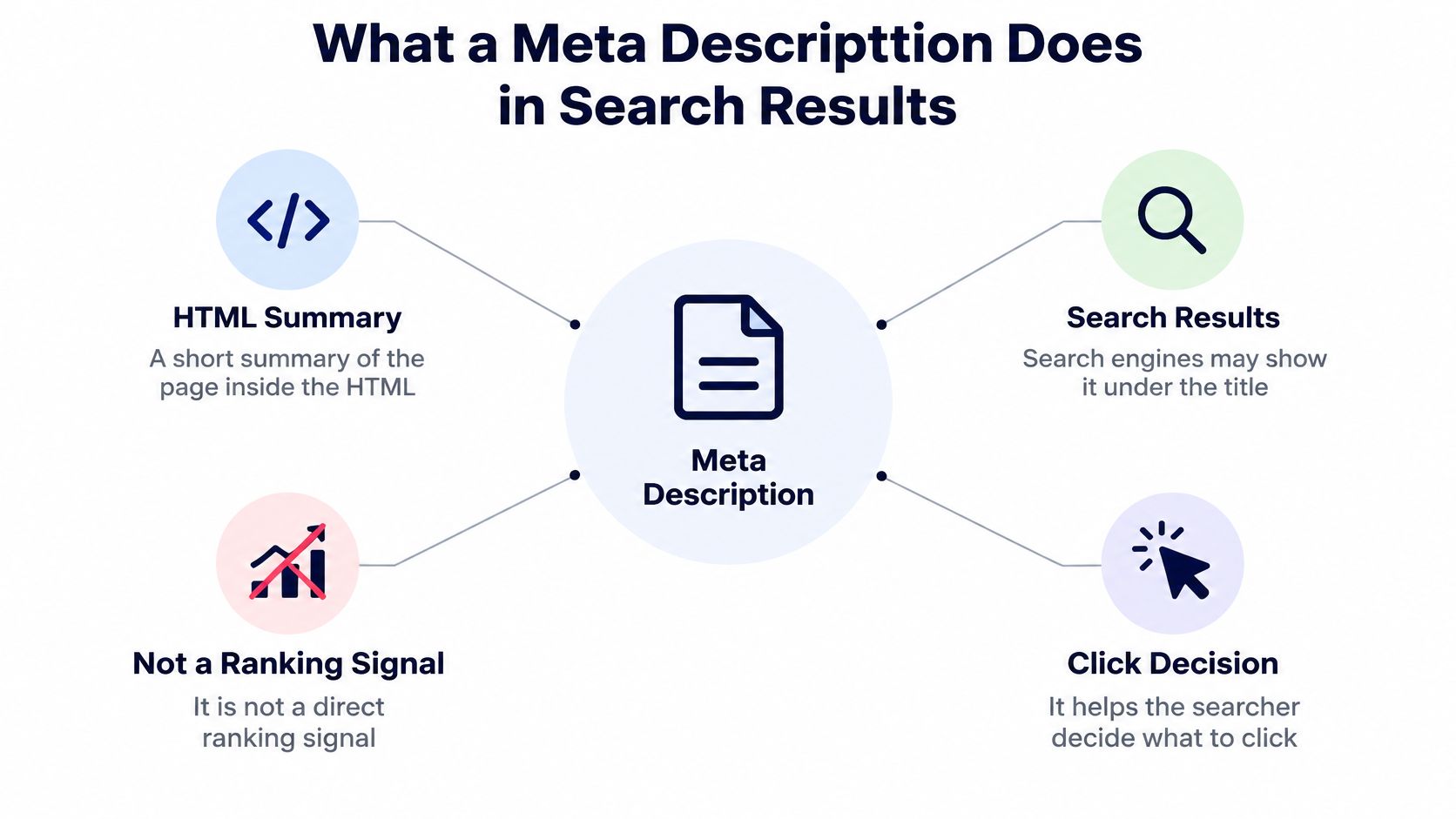
So where does snippet text come from? Mostly from visible page content. Google generates snippets automatically, draws them primarily from the page body, and falls back on the description when that text summarizes the page better or when the page has little textual content. Current guidance describes the tag as a short page summary used in snippets in some situations, not as a guaranteed replacement for page content.
The conclusion is narrow and reliable. Write the description as a preview of the page, because that is the one job it can do consistently, and pair it with machine-readable markup covered in our guide to schema markup for SEO so crawlers and AI assistants read the same facts a person would.
How Often Google Shows Your Description as Written
A 2023 analysis of SEO statistics found Google displayed the supplied meta description in search results only 37.22% of the time. That is the useful starting point: the tag often matters less as a displayed sentence than as one candidate source for the snippet. Roughly two results in three carry text Google assembled itself from the page.
That pattern reflects how result snippets are chosen. Google builds the preview around the words in the query, pulling the passage that best answers it. One page can show three different previews for three different searches, even when the tag stays unchanged.
Take a product page for front brake pads. A brand-name search may show the description you wrote. A search for "front brake pads VW Golf" may show the compatibility line buried in the specification table. A search for the pads plus a city may show the fitting and booking sentence from the service section. Your description competes with all of that, so its job is to give Google one clean, accurate option rather than to dictate the final preview.
What to do with that: write the description as an invitation that reflects the page's main subject, not as an advertisement you expect to see in every result. The tag is an input Google can choose, and it chooses it more often when the page body is thin or your text genuinely beats the surrounding copy.
Then run the check. Search the page's three or four most important queries, screenshot the snippet, and compare it with your description. If a key attribute is missing, a product type, a location, a service outcome, add it to the visible introduction as well as the tag. Both candidate sources then carry the same fact, which gives Google less reason to pull a weaker passage from deeper in the page.
If the snippet keeps ignoring your description across every query, the page content is usually the thing to fix first. A description that summarizes a page accurately still loses to a page that states the same facts plainly in its opening paragraphs.
What Click Tests Show and How to Run Your Own
Start with the largest number available. A Search Engine Land analysis of meta descriptions cites a study of 4 million Google search results in which pages with a meta description received an average of 5.8% more clicks than pages without one. That gap is wide enough to make description coverage a real quality metric across a large catalogue.
It is also a correlation. Pages with carefully maintained descriptions tend to have better titles, clearer structure, stronger content and someone paying attention. The 5.8% may belong to that whole package rather than to the tag alone. A comparison is not an experiment.
The experiments do exist, and they disagree with each other. A SearchPilot case study on removing meta descriptions reports an e-commerce split test, a salary-range test and a travel test run in two markets, all measuring the same kind of intervention at different sites.
| Study or test | Change examined | Reported result |
|---|---|---|
| Analysis of 4 million Google results | Pages with a meta description versus without | 5.8 percent more clicks, a correlation rather than proof of cause |
| E-commerce listing test | Descriptions removed from listing pages | Estimated 4.2 percent more organic sessions, at 90 percent confidence and below the 95 percent threshold |
| Salary range test | Salary ranges added to descriptions | Estimated 7 percent drop in organic traffic |
| Travel test in India | Save 30 percent message added | 21.2 percent more organic sessions |
| Travel test in the UK | Save 30 percent message added | Not statistically significant |
Why the Four Tests Point in Different Directions
Read the e-commerce row first. Removing descriptions from listing pages produced an estimated 4.2% rise in monthly organic sessions, but the result cleared only the 90% confidence level and missed the 95% threshold the team had set. That's a hint, not a finding, and a team shipping on it would be guessing.
The salary test moves the other way. Adding specific pay ranges cut organic traffic by an estimated 7%. Detail that helps a matching searcher can repel a mismatched one or make the result look less appealing next to competitors. More information isn't automatically better information.
The travel test splits by market. The "Save 30%" message lifted organic sessions by 21.2% in India while the UK result wasn't statistically significant. Same offer, same page type, different country, different outcome. Market, intent and message type all change what a description is worth.
A description change is a landing-page experiment, not a site-wide rule. Ship the winners per market, and accept that some markets may have no winner at all.
How to Run Your Own Description Test
- Pick URLs with enough impressions. A page that appears a few hundred times a month won't produce a readable difference within a few weeks; a busy category page will.
- Split comparable URLs at random into two groups. The control keeps its current description, the test group receives the new one, and splitting by URL keeps the sets independent.
- Change one message variable per test. Benefit, price, availability, destination or a trust cue, one at a time. Two changes at once tell you nothing about either.
- Record the baseline before you touch anything. Impressions, average position, click-through rate and organic sessions, segmented by country and device.
- Confirm Google displayed the new text for the target queries before crediting any traffic movement to it. If the snippet never changed, you measured noise.
- Fix the 95% significance threshold in advance and write down how long the test runs. Deciding afterwards invites you to keep an ambiguous result.
- Keep a winning variant only if the gain holds across the markets you sell in. A single-country lift that disappears elsewhere is a local quirk.
Treat each change the way you'd treat a landing page optimization test: hypothesis, control, one variable, and a stopping rule declared up front. The difference is that your intervention sits in the preview, so you also have to verify what was displayed.
How to Write a Description for Each Page Type
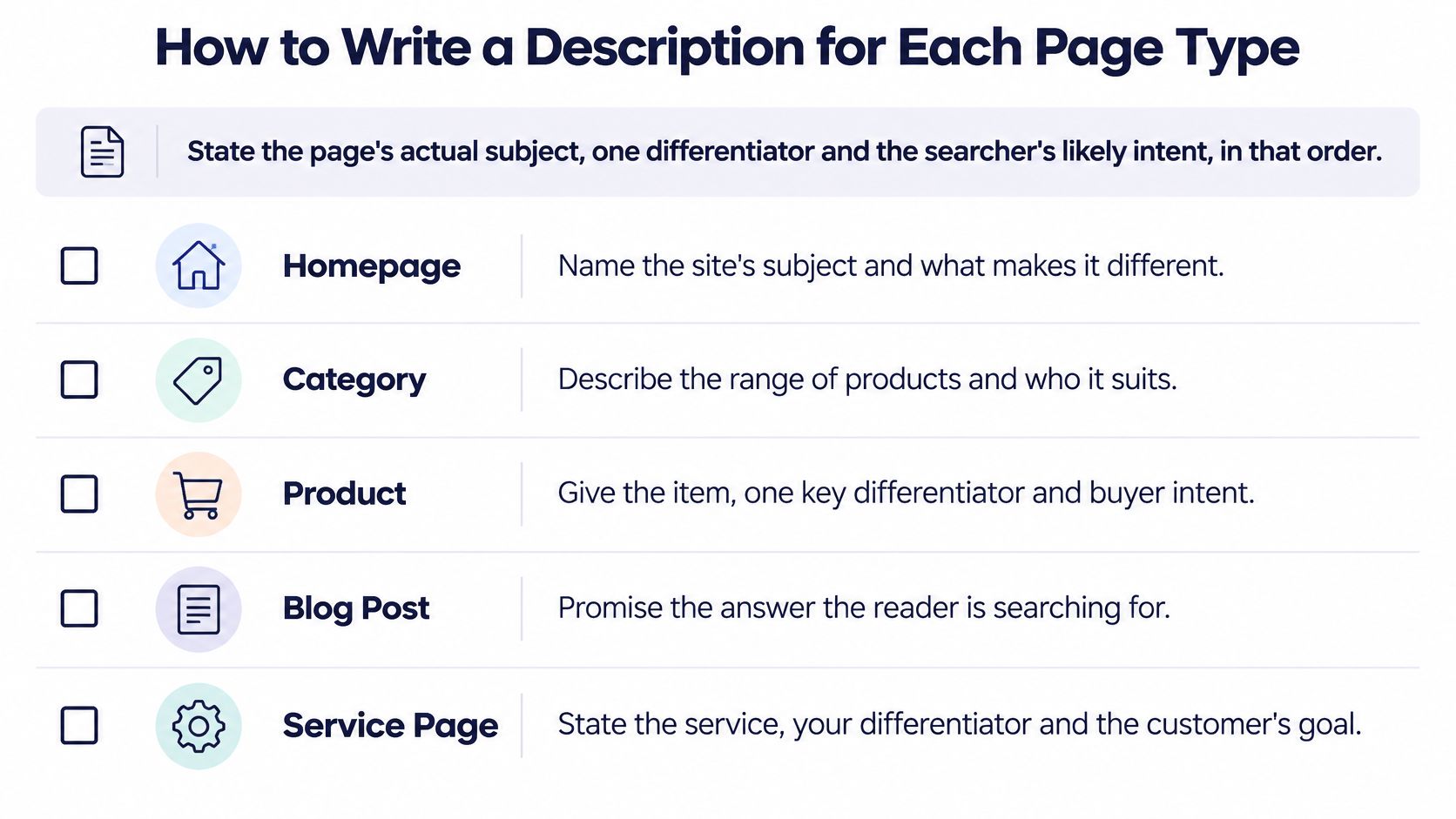
The principle fits in one line: state the page's actual subject, one differentiator and the searcher's likely intent, in that order. Everything beyond that is page-specific.
Having a description stopped being a differentiator years ago. Meta descriptions appeared on 67.7% of desktop pages and 67.2% of mobile pages in 2025, according to HTTP Archive data reported in SEO statistics. Presence is table stakes; specificity is the advantage.
| Page type | Description should state | Example pattern |
|---|---|---|
| Product page | Product type, one key attribute and the main use | Handmade leather belt, 35 mm wide, ships within 2 working days |
| Category page | Scope of the range and who it suits | Oak dining tables for four to eight people, with extension options |
| Service page | Service, location and outcome | Brake repairs in Tallinn with same-day quotes |
| Article page | The question answered and who it helps | Step-by-step checklist for planning a product photo shoot on a small budget |
| Brand or about page | Who the business serves and what it offers | Family-run bakery supplying cafes across the city with daily bread |
The pattern works because it forces a commitment to a fact. A product description built that way has a reason to exist. A description reading "shop our wide range of quality belts" could sit on ten thousand pages without changing a word.
Building-materials sellers face the same test. A page weighing up deck screws versus hidden fasteners should say in its description which trade-off it settles, because the searcher already knows both options exist and wants the verdict.
Here is the checklist version of the same idea.
The Writing Rules That Hold Across Every Page Type
- Give every indexable URL its own text. Boilerplate across products or categories wastes the one field that could distinguish them.
- Lead with the subject and keep the claim accurate. Inflated wording gives a searcher less reason to click, not more, and Google may replace the text entirely.
- Work within roughly 150 to 160 characters. Truncation happens by screen width rather than character count, so this range keeps the core message visible on most devices. Put the decisive detail in the first line.
- Write language-specific descriptions for each market instead of translating one template. The snippet is chosen against each query, and a translated template reads like one. Our guide to multilingual website SEO covers the surrounding mechanics.
- Don't stuff keywords. A repeated term adds no reason to click and invites a rewrite you don't control.
- Check the rendered HTML, not the CMS field. Caching, plugins or templating can drop the value before it reaches the page.
A good description is written for the person reading the result, not for a formula that doesn't exist.
Using AI Drafts Without Losing Accuracy
The usual question is whether a model can produce a description that reads well. The useful question is whether it produces one that earns clicks. A 2025 controlled test reported in research on AI meta descriptions and title tags found ChatGPT-4-generated descriptions reduced click-through rate by 21.5%, while human-written descriptions increased it by 16.3% across 237 pages.
One test on 237 pages doesn't condemn every AI workflow, and it shouldn't be read that way. What it does undercut is the assumption that automated text is effective by default. Generic claims weaken a searcher's reason to visit, and a model without product context produces generic claims reliably.
The split that works in practice looks like this.
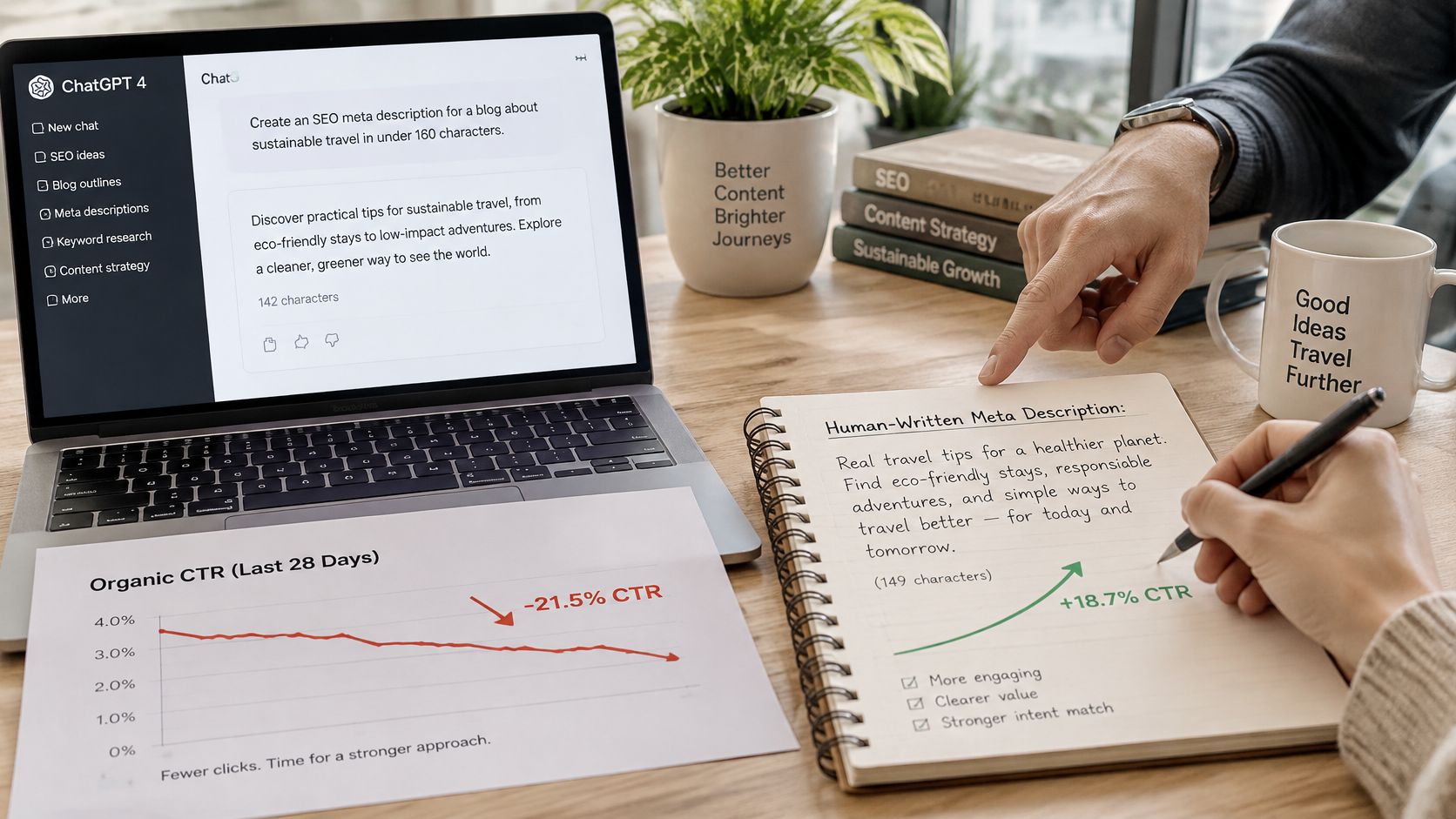
Drafting. AI earns its place on first drafts, multilingual variants and long-tail pages where the alternative is no description at all. It reads a page faster than a person and returns five options in the time one takes.
Reviewing. The reviewer supplies what the model can't see: the buyer, the commercial reason, the attribute that makes this item different from the one beside it. Accuracy, specificity and alignment with the landing page are the three checks, in that order. Responsibility for reviewing and checking AI output before publishing it, including product descriptions, translations and images, stays with the business that publishes it.
Approving. A named approver signs off before anything goes live, and a before-and-after comparison in Search Console, segmented by device, shows whether the new text helped or just changed.
The honest framing: AI's value here is operational speed. A click lift is not a default outcome, so review should ask one question. Does this description say something specific and true about this page?
Check Your Descriptions Before You Publish
Audit before you write. Pull the indexable URLs with the most search traffic first, working through commercial pages and the editorial pages already earning impressions. Flag three conditions on each: missing, duplicated, or boilerplate repeated across a template. This keeps the work tied to pages where the preview can matter, while accepting the limit that a description only controls what appears when Google chooses to show it.
Rewrite a flagged page using the pattern its page type calls for, then check it against the page itself. The description and the visible headings and introduction should tell the same story, because Google may quote either. A useful test is simple: if the snippet were the only thing a searcher read, would it still name the page's real value and match what the click leads to?
Confirm the rendered HTML carries the intended value before release, and put every AI draft through the approval gate described above. On CIQRA, meta title and description patterns are set once per page type and can be overridden on any page. That structure keeps a large catalogue consistent without flattening it into boilerplate. AI drafts wait for your approval before anything goes live. The customer is responsible for reviewing and checking AI output before publishing it or relying on it.
Record the date of every change so the Search Console comparison has a clean before and after window. Start with the 20 highest-traffic pages: write and approve their descriptions this week, then review impressions and click-through rate for those pages before expanding to the rest of the site. Treat click-through rate as evidence, not proof, because the same wording can perform differently by query and market. Visit CIQRA to set up page-type patterns and approvals.