
Schema markup for SEO makes visible facts machine-readable so eligible pages can earn richer search treatments; it isn't a ranking factor or a special requirement for AI Overviews. Adding more markup won't automatically move a page higher in search or make an assistant cite it.
The popular advice to mark up everything confuses description with promotion. A careful implementation starts with the page shoppers can see, identifies the facts search engines need, and keeps those facts accurate when prices, translations, stock, or search features change.
Table of Contents
- What Schema Markup Changes in Search
- How a Page Becomes Machine Readable
- Schema Types Worth Adding First
- Click and Visit Changes from Real Sites
- How to Add and Check Schema Markup
- Markup to Keep When a Feature Ends
- Decide Which Pages Get Schema Next
What Schema Markup Changes in Search
Schema markup is a shared vocabulary for describing entities, such as a product, business, author, or event. It lets a search engine distinguish a selling price from an old price, identify who wrote an article, or understand where a product sits in a category hierarchy without relying solely on the layout.
For SEO, the useful distinction is between ranking and search appearance. Ranking determines where a page appears. Structured data can help an eligible result display additional information, but it doesn't purchase a better position.
Markup describes what's already on the page. It doesn't vote the page up.
Google still needs to index the page and consider it eligible for a search snippet. Adding structured data doesn't bypass those requirements, and hidden or misleading annotations can undermine eligibility for an enhancement.
This is ordinary website infrastructure, not an obscure optimization trick. According to the HTTP Archive's Web Almanac figures summarized by SEO Statistics, structured data appeared on 50% of desktop and mobile home pages in 2025, up from 48% of desktop and 49% of mobile home pages in 2024.
Separate the outcomes before choosing the markup
A useful implementation brief distinguishes these jobs:
- Rich-result eligibility: Give a supported feature the information it needs, such as product availability.
- Entity disambiguation: Clarify which business sells a product and which brand makes it.
- Performance measurement: Track rankings and AI citations separately instead of attributing every change to schema.
For an additional implementation perspective, schema advice from Up North Media can sit alongside your template checklist. Keep the acceptance criteria concrete: the page, its supported type, and the intended search treatment.
Teams also reviewing machine-access controls should treat AI-search visibility and llms.txt as a separate workstream. Crawler instructions, entity descriptions, and visible search enhancements aren't interchangeable.
How a Page Becomes Machine Readable
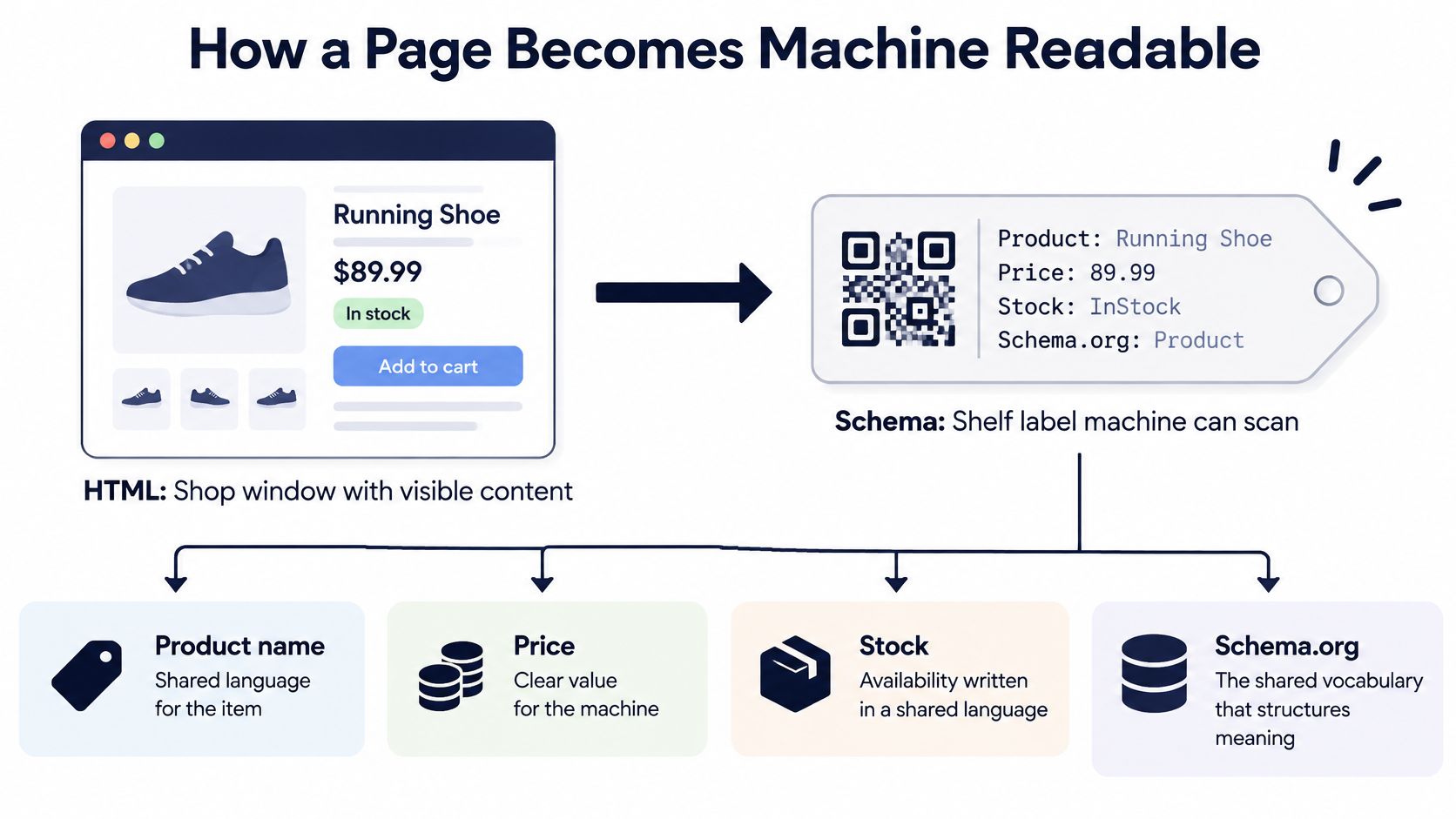
Think of HTML as the shop window and schema as a shelf label a machine can scan. The window presents the item to a shopper. The label identifies the product name, selling price, and stock status in a shared language.
Schema.org supplies that vocabulary. A type identifies the kind of thing being described, such as Product; properties describe its attributes, such as name. An associated Offer describes the commercial terms rather than the physical item itself.
Choose a format your templates can maintain
Google Search accepts JSON-LD, Microdata, and RDFa. For a new implementation, JSON-LD is usually the practical choice because its annotations sit in a script block rather than being distributed across presentation elements.
According to Search Engine Journal's structured-data analysis, JSON-LD adoption reached 41% in 2024, a 7-percentage-point year-over-year increase. Its separation from layout also makes changes easier to review when developers compare template versions.
Structured data formats Google Search accepts
| Format | Where it lives | Best fit | Main drawback |
|---|---|---|---|
| JSON-LD | Script block, separate from the layout | Templates, catalogues, anything generated at scale | Can drift from visible text unless both use the same fields |
| Microdata | Attributes on visible HTML elements | Older themes that already mark up visible nodes | Harder to maintain when the design changes |
| RDFa | Attributes in HTML, often with extra vocabularies | Pages already published in RDFa | More verbose and less common in commerce templates |
Translate a product statement into fields
Say a product page displays a current selling price in euros and tells shoppers the selected item is in stock. The product's Offer should carry that same amount in price, identify euros through priceCurrency, and express the stock status through availability.
The important relationship isn't between a handwritten script and a screenshot. It's between the underlying catalogue fields and both outputs: the shopper-facing page and the structured data.
A validator might accept the syntax of an invented rating or delivery promise. That doesn't make the claim appropriate. If visitors can't find the corresponding review evidence, shipping information, or question and answer, technical validity alone won't establish eligibility.
Finally, Schema.org is broader than Google's supported search features. A type can be legitimate vocabulary without enabling any particular Google presentation.
Schema Types Worth Adding First
Choose markup by page purpose, not by the number of types your plugin offers. A product detail page needs a clear product and offer description; a blog post needs article metadata. Neither benefits from unrelated event or recipe annotations.
Start with templates that already contain useful commercial or navigational evidence. The table separates what you're describing from the search treatment you might receive, because those aren't the same promise.
Schema types to add first and what they can change
| Type | Use on | Must be visible | Search treatment to expect |
|---|---|---|---|
| Product and Offer | Product template | Name, price, currency, availability | Price and availability in eligible product results; no ranking boost |
| AggregateRating | Pages with real reviews | Rating value and review count | Stars only for eligible types and compliant reviews shown on the page |
| BreadcrumbList | Category and product URLs | The same trail the visitor sees | A path where breadcrumb displays are supported |
| Organization or LocalBusiness | Home or store page | Name, logo, and address or contact details if claimed | Clearer entity data; not a knowledge-panel guarantee |
| Article | Blog or news | Headline, date, author | Metadata for eligible article and news presentations |
| FAQPage | A real question list | Every question and answer | Valid vocabulary; don't assume an expanded FAQ listing remains available |
| HowTo | Genuine instructions | The steps, in order | Don't add it to chase a how-to rich result |
| Event | A specific event page | Name, start date, location | Date and place when the feature and page qualify |
| Recipe | A recipe page | Name, ingredients, preparation or cooking time | Recipe rich results only for qualifying recipe content |
Match the evidence to the entity
For a product, distinguish the item from the offer. A manufacturer's product name belongs to the item; the merchant's current price, currency, and availability belong to its offer. Review totals must describe the relevant item rather than an unrelated collection or the business as a whole.
Organization and LocalBusiness answer a different question: who operates the site or location? Use the most specific accurate description, and don't add a physical address because a generator leaves a space for it.
Directory publishers face an extra distinction between their own organization and the businesses they list. Resources on SEO tactics for niche directories are useful context, but each listing still needs evidence belonging to that particular business.
Connect related nodes without multiplying claims
A store can connect Organization, WebSite, Brand, Product, and Offer through stable identifiers. This lets the graph distinguish the site operator, the manufacturer, the item, and its selling terms without treating them as disconnected names.
Use identifiers consistently across templates. A brand should not become a different entity merely because its name has been translated, while a market-specific offer must reflect the terms that shopper receives.
For merchants also distributing catalogue information, the Google Shopping product feed guide helps frame a related operational task: keeping feeds and landing pages consistent. A feed isn't a substitute for accurate page markup.
Prefer a primary page type with relevant supporting nodes. Add FAQPage only for genuine questions and answers, and HowTo only when instructions are the main content, not because either appears in an old SEO checklist.
Click and Visit Changes from Real Sites
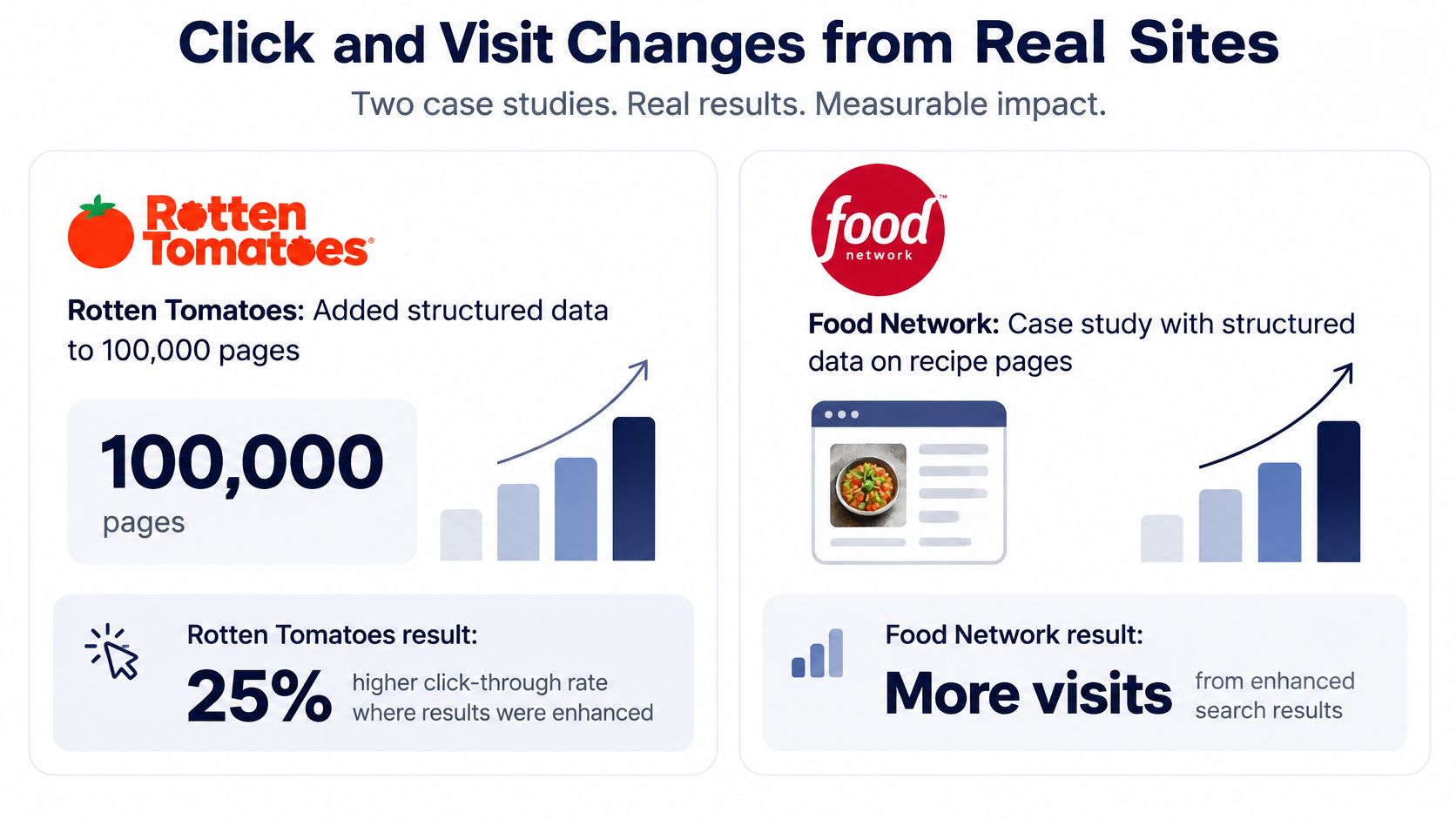
Published examples show why richer search appearances are worth testing, but they don't establish an expected return for your catalogue. These are individual case studies, not industry averages, and their comparisons measure different outcomes.
The structured-data case-study summary reports that Rotten Tomatoes added markup to 100,000 pages. Google's introduction to structured data reports 25% higher CTR for its enhanced pages, 35% more visits for Food Network after enabling search features on 80% of pages, 1.5 times more time spent on Rakuten's marked-up pages, and 82% higher CTR for Nestlé's rich-result pages compared with non-rich-result pages.
Published structured data outcomes
| Site | What changed | Reported result | What it does not prove |
|---|---|---|---|
| Rotten Tomatoes | Structured data deployed across a large page set | Higher CTR on enhanced pages | A ranking increase |
| Food Network | Most pages enabled for search features | More visits | The same lift on a small catalogue |
| Rakuten | Structured data on pages | More time spent on those pages | That markup alone caused the extra time |
| Nestlé | Pages appearing as rich results | Higher CTR versus non-rich-result pages | A universal CTR multiplier |
Measure the search appearance, not just total traffic
The mechanism is straightforward: a result can display more of the information someone needs to decide whether to visit. A relevant price or rating may make the listing more useful for that query. It doesn't follow that every extra detail produces another click.
Before applying a published uplift to a forecast, consider brand familiarity, query mix, the share of results enhanced, and simultaneous template changes. A redesigned recipe page and newly added markup don't form a clean test of markup alone.
Use Search Console to compare stable URLs over several months:
- Search appearance: Separate eligible enhanced appearances where reporting supports it.
- Country and device: Avoid mixing markets or interfaces with different feature availability.
- Query: Distinguish branded searches from product and informational searches.
- Impressions, clicks, and CTR: Check whether exposure changed before crediting a better click rate.
The distinction between SEO data vs traffic data is useful when choosing reporting tools. Search visibility, estimated competitor visits, and your own measured sessions answer different questions.
A technically valid page can still receive a plain search listing. Feature availability, the query, and Google's presentation choices remain outside the template team's control.
How to Add and Check Schema Markup
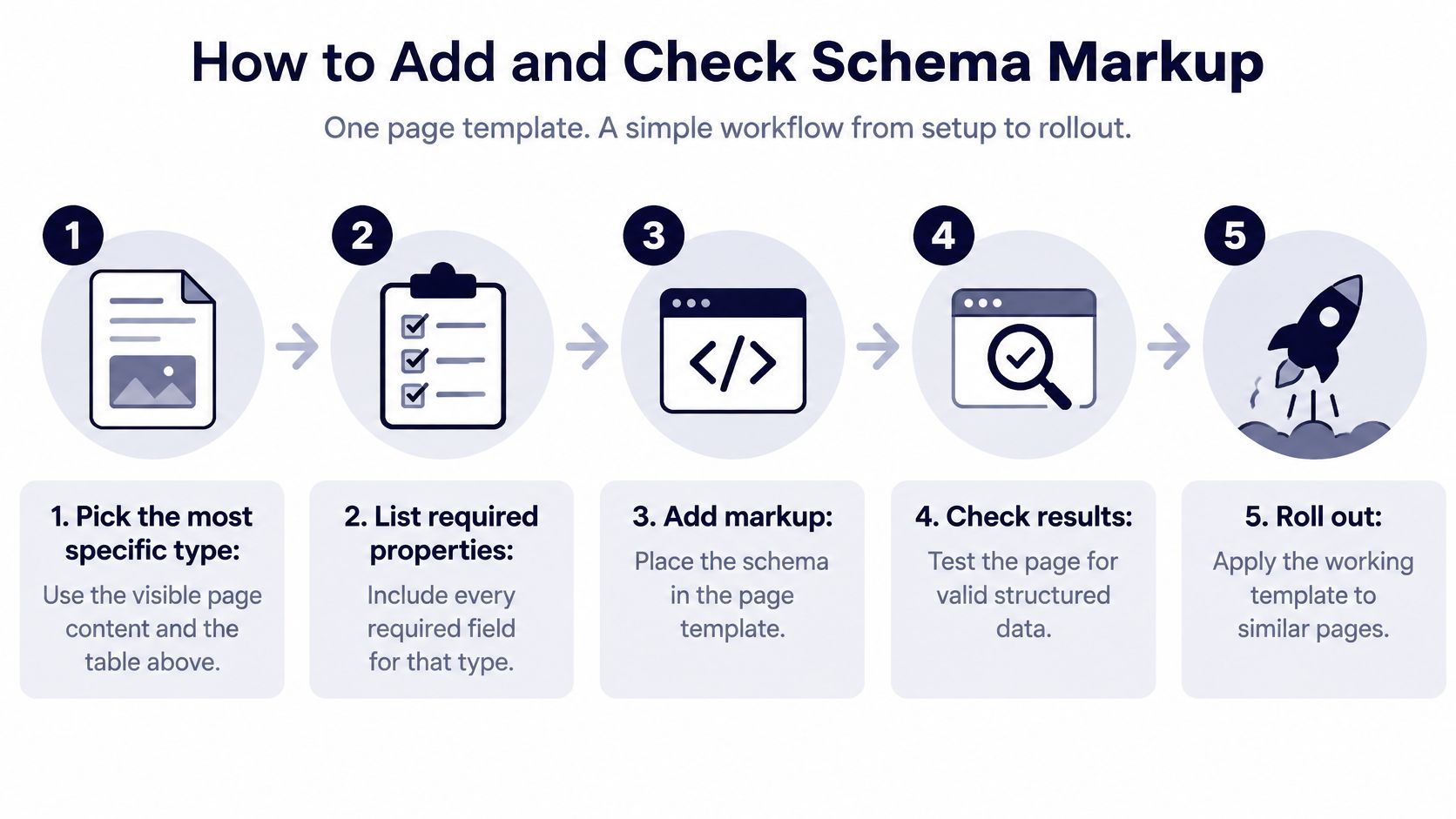
Start with a representative template rather than a site-wide rollout. Choose a page whose visible information is complete, then test the implementation against realistic catalogue changes before copying it across the store.
Google's structured-data policies require markup to represent visible page content and warn against hidden, misleading, irrelevant, or stale information. Google's feature-specific documentation determines eligibility, not the existence of a property somewhere in the Schema.org vocabulary.
Run the template through a controlled release
Pick the most specific supported type and list its required properties. Read the documentation for the intended feature before building the template. Separate required fields from recommended ones, and identify where each value will come from.
Bind values to the fields the shopper sees. Use the translated product name, current selling currency, selected variant's availability, and appropriate canonical URL. A German-language page isn't restricted to euros, but its markup must not claim a dollar offer when its visible offer is in euros. Likewise, an unavailable variant mustn't retain
InStockbecause another variant can be purchased.Generate JSON-LD from the template. Avoid individually pasted scripts for catalogue pages. Use the same source fields for the visible product details and the structured data, and check whether an existing theme or plugin already produces overlapping markup.
Validate, then compare against the rendered page. Use Google's Rich Results Test for supported Google features and the Schema Markup Validator for broader vocabulary checks. Fix missing required fields and syntax errors, then manually verify the claims. A passing test won't tell you that a delivery promise is commercially wrong.
Publish a limited sample and inspect the URLs. Use Search Console's URL Inspection tool to check representative published pages and what Google can access. Include translated pages and variant states in the sample rather than testing only the default product.
Monitor enhancement reports and assign fixes. Review applicable Search Console reports for errors and warnings. Group affected URLs by template so developers can repair the shared cause instead of editing individual pages.
Test changes, not just launch day
Exercise the states that can break a working implementation: a sale ending, an item selling out, a review being removed, or a translated page being updated later than its source. Confirm that each change reaches both the page and its graph.
Release check: A green validator result confirms a technical condition. A person still needs to confirm that the marked-up facts are true.
Keep validation evidence with the template release so editors and developers can see what was checked. Record intentional omissions too, particularly when a recommended field doesn't have reliable source content.
Inaccurate markup can cost the enhancement even when the script remains syntactically valid. Treat this check as part of publishing and catalogue maintenance, not a completed one-time SEO project.
Markup to Keep When a Feature Ends
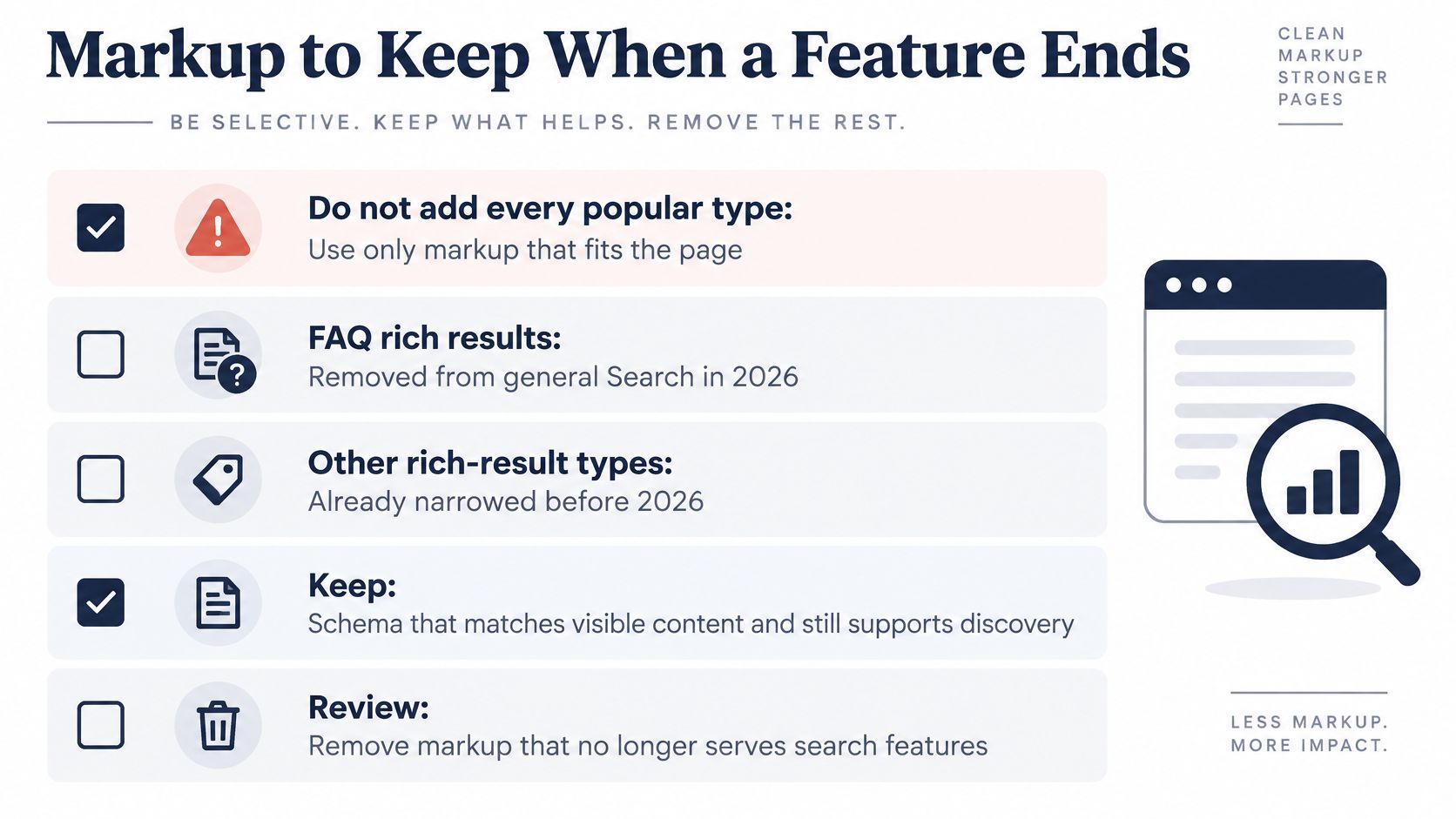
Industry coverage from Denver SEO reports that Google removed FAQ rich results from general Search in 2026, following earlier narrowing or retirement of other result types. Treat that as an industry-reported feature change, and check current Google support before committing development time.
The operational implication is more durable than any particular feature announcement: valid vocabulary and an available search treatment are separate things. A useful FAQ page doesn't become useless when Google stops expanding its answers in search.
Apply a keep-or-cut test
Retain markup when it accurately describes useful visible content and has a clear purpose, such as identifying a product or supporting another consumer of structured data. Remove unnecessary implementation work when its only justification was a discontinued Google display.
- Keep the content: Useful answers and instructions can still help visitors without an expanded listing.
- Review the dependencies: Check generators, validation rules, dashboards, and scheduled reports that assume the feature remains available.
- Remove unsupported claims: Don't leave invented ratings, obsolete shipping promises, or outdated return terms in an otherwise valid graph.
- Document the decision: Record why the type remains, who consumes it, and who will maintain it.
Apply the same judgment to reviews, Q&A, bundles, shipping, and returns. Their business usefulness doesn't mean every relationship has a corresponding Google feature.
Give the graph an owner
Maintain a support matrix with type, required properties, on-page evidence, target market, last validation date, and business owner. The owner should be able to resolve a mismatch, not merely acknowledge an automated alert.
Keep template changes in version control and require approval for bulk revisions. During a platform move, include structured-data output and entity identifiers in the ecommerce replatforming SEO checklist, so a new theme doesn't replace consistent data with conflicting defaults.
Google's AI-search guide for marketers says AI Overviews and AI Mode introduce no additional technical requirements or special Schema.org vocabulary. Don't replace retired-feature work with an unsupported “AI schema” project.
Maintenance priority: Spend effort on accurate offers and consistent identifiers before adding another type with no defined consumer.
A smaller, maintained graph is preferable to an extensive one nobody can safely update. Fast correction matters when commercial facts or eligibility rules change.
Decide Which Pages Get Schema Next
Leave with a short template shortlist, not a plan to implement the entire vocabulary. For a retailer, the sensible starting point is usually product detail pages, followed by breadcrumbs, business identity, and editorial articles.
Choose the candidate with the clearest source fields and an owner who can maintain them. A heavily visited product template with inconsistent stock data needs a catalogue fix before it needs a larger schema script.
Make the page-level decision explicit
- Select the template: Name the page family and intended search treatment.
- Check the evidence: Confirm that the marked-up facts appear in the language and currency of that URL.
- Assign responsibility: Put price, availability, and translation ownership into the support matrix.
- Choose a test sample: Include ordinary pages and awkward cases, such as unavailable variants or missing optional reviews.
- Review the outcome: Compare search appearances and engagement after a few months without assuming every traffic change came from markup.
If your site runs on CIQRA, we support product and FAQ JSON-LD alongside llms.txt publishing and rules for individual AI crawlers. These controls let you publish machine-readable facts for assistants to quote, but they don't guarantee retrieval or citation. You still choose what goes live, and the page must support every marked-up price, review, and answer.
On another platform, use the same decision standard: template-generated JSON-LD, reliable source fields, and a recorded reason for keeping any type without a current Google display.
Approve the next template only when someone owns its accuracy. The useful outcome isn't a larger count of schema types. It's a result that can show the correct offer or path, backed by a catalogue whose identities and commercial facts remain consistent.
CIQRA brings website and store publishing together with structured-data and crawler controls. Visit CIQRA to explore how you can publish product and FAQ JSON-LD alongside your pages, then start by checking a representative template against the facts shoppers see.