
A customer messages you about a jacket. The size chart on your site says the medium fits a 38-inch chest. The marketplace listing says 40. Both pages were fed from the same product record, and one of them is wrong.
That's the everyday shape of a catalogue problem. Nobody typed the wrong number twice. Someone changed a field in one place, the change never reached the other channel, and now the shopper is doing your quality control for you.
Product catalog management is the work of keeping that shared record true: one product identity, one set of verified attributes, and channels that read from the same source instead of inventing their own versions. It sounds like admin. In practice it decides whether a shopper trusts your size chart, whether the warehouse ships the right parcel, and whether a marketplace feed keeps your listing live.
This guide builds the system in order: the six stages every product passes through, the attribute groups that carry the facts, how to measure quality per SKU and per channel, how to publish one record to many places, where AI copy belongs, and how to pick a setup that fits your business.
Table of Contents
- The Product Catalog Lifecycle, Stage by Stage
- Why Catalogue Errors Cost Sales and Trust
- Attribute Groups Every Product Record Needs
- How to Run a Catalogue Quality Check
- Publishing Across Channels and Languages
- Using AI for Product Copy Without Losing Accuracy
- Choose a Catalogue Setup for Your Business
The Product Catalog Lifecycle, Stage by Stage
Every product in your catalogue passes through the same six stages, whether it's a single candle or a growing range of spare parts. The table below is the whole system at a glance, with the owner who signs off each stage and the failure that appears most often.
| Stage | Main task | Owner | Output | Common failure |
|---|---|---|---|---|
| Collect | Gather raw product data from suppliers and internal teams | Supplier or buyer | Raw product records | Missing or outdated specifications |
| Enrich | Write descriptions, attributes and images | Content team | Complete product records | Copy that contradicts the specifications |
| Validate | Check identifiers, units and required fields | Catalogue manager | Approved records | Unchecked GTIN or wrong shipping weight |
| Publish | Send approved data to each channel | Channel manager | Live listings and feeds | Stale feed after a change |
| Maintain | Update prices, stock and changes | Catalogue team | Reconciled catalogue | Drift between channels |
| Retire | Remove or archive discontinued products | Catalogue manager | Archived records | Discontinued items still listed |
The stages repeat rather than finish. A price change doesn't create a new product; it sends the existing record back through validation and publishing. A new colourway enters at enrich, then validation, then publish. Read the lifecycle as a loop with a long maintain phase, not a straight line from supplier to archive.
Think of the catalogue as the map of a shared warehouse rather than a filing cabinet in one person's desk. Every channel reads the same map. If shelf 14 is labelled "blue, size M" when it holds "blue, size L", every shopper who follows that label gets the wrong item, and so does the picker. The map is only useful if everyone is reading the current version.
Publishing is where speed and control pull against each other. A feed that pushes a price change in seconds also pushes a typo in seconds, to every destination at once. The answer isn't slower publishing. It's a stricter gate before it.
The reach is bigger than many picture. In 2024, product-information professionals published product data to an average of 11.5 destinations and used an average of 10.6 formats, according to RIWI's 2024 Product Information Management Report. Each destination has its own field names, units and length limits, which is why the publish stage produces so many avoidable failures.
Use the table as a diagnostic rather than a description. Find the stage where your team improvises most, then read across to the failure column. That failure is usually your most expensive fix, because it's the one already reaching customers.
Why Catalogue Errors Cost Sales and Trust
A catalogue looks like a list of names and prices. Operationally, it is a shared operational record that merchandising, logistics, replenishment, compliance and customer service all read from. When that record drifts from what the supplier ships, the cost shows up in returns, refunds and support tickets instead of on a data-quality dashboard.
The scale of that drift has been measured. A 2009 GS1 UK data quality study compared 4,290 unique GTINs for product cases and packs across four major supermarket retailers and four major suppliers. Retailer-held product information was inconsistent in well over 80% of comparisons, and fewer than 25% of retailer records matched supplier data overall. Pack dimensions, volumes and weights showed less than 50% consistency even when two retailers' records were compared with each other.
The workload behind those numbers explains why errors persist. The average product record in that study held 66 attributes, covering dimensions, weights, packaging and logistical data, and GS1 projected that retailers would need to manage as many as 250 attributes per product within five years, an increase of nearly 400%. More fields mean more places for a fact to be wrong, stale or missing. A catalogue team can correct a title quickly, then miss a gram-to-kilogram unit in a field that only the warehouse notices later.
A barcode does not rescue a record on its own. A 2011 study by GS1 UK and Cranfield School of Management scanned 375 grocery products through three third-party mobile barcode apps and found 75% of scans returned no product data and 91% returned incorrect descriptions; later GS1 research found 86% of shoppers were unlikely to buy from a brand after inaccurate product information (GS1 data quality case study). A correct identifier pointing at a wrong description is still a wrong product to the person holding the phone.
A wrong weight on a product record works like a wrong address on a parcel. Everything downstream proceeds confidently and in good faith, and the parcel arrives somewhere it should not. The same pattern appears across SKUs: a small field error changes a shipping quote, a marketplace title, a customer's expectation and eventually the reason code on a return. Quality therefore needs to be measured per SKU and per channel, because one clean storefront page can hide a broken marketplace feed.
Trust breaks in the same direction. Buyers forgive a slow delivery more readily than a listing that promised a material, a size or a certification the product does not have. Accurate description is a catalogue skill in its own right. Sellers who separate influence from origin instead of letting a vague label do the selling, as discussed by HD Asian Art on Khmer attribution, apply the same discipline that every product field needs: state what the item is, state what it is not, and avoid leaving a customer to guess.
Three risk areas are worth auditing in your own catalogue this week:
- Merchandising risk: a pack size or bundle description that differs between the product page and the marketplace listing, so the shopper compares two versions of your offer and buys neither.
- Logistics risk: a shipping weight or dimension that does not match the physical item, which misprices carriage and breaks replenishment planning.
- Compliance risk: a missing allergen, country of origin or certification field, which turns a listing into legal exposure rather than a sale.
Each risk has a measurable cost. Merchandising errors reduce confidence at the moment of comparison. Logistics errors move the cost into shipping, picking and restocking. Compliance errors can stop a sale before it starts or create a problem after it is made. A catalogue quality check should look for all three, because the cheapest error to fix is the one still sitting in the record rather than already repeating across channels.
Attribute Groups Every Product Record Needs
A record is only as trustworthy as its weakest field. Group the fields and you can give each group an owner and a rule, instead of arguing about every cell in the spreadsheet.
| Attribute group | Examples | Validation rule | Failure example |
|---|---|---|---|
| Identity | GTIN, SKU, brand, model number | Unique per product and passes GTIN check digit | Same GTIN on two different products |
| Dimensions and weight | Length, width, height, net weight | Units stated and values in a plausible range | Weight in grams on one channel and kilograms on another |
| Materials and compliance | Materials, allergens, country of origin | Required for the category and taken from a controlled list | Allergen field missing on a food listing |
| Variants | Size, colour, parent-child link | Each variant has its own SKU, price, stock and image | Two sizes sharing one stock count |
| Media | Product images and alt text | Shows the correct product in its current version | Old photo of a discontinued model |
| Localised content | Translated titles and descriptions | Matches source attributes in every language | Translated size chart disagrees with the source |
Identity comes first because every other field inherits its trust. A GTIN carries a check digit precisely so a transposed number fails loudly instead of attaching itself to the wrong product. If identity is wrong, correct dimensions and a good description just make the wrong record more convincing.
The variant rule trips up most growing catalogues. A shirt in three sizes and two colours is six records, not one record with a helpful note. Each needs its own SKU, price, stock level and image, tied to a parent product so the storefront can offer a size selector. When two sizes share one stock count, the first sale of the medium tells your warehouse the large is gone.
Units are the quiet failure. Weight entered in grams on the storefront and kilograms in the marketplace feed changes a carrier's calculation without anyone seeing a decimal point move. State the unit as part of the value, and validate the range so a lightweight item can't pass as a heavy one.
Localised content is a copy of the facts, not a second set of facts. A translated size chart must agree with the source attribute it came from, because the shopper reads only one language and will treat that version as the truth.
Practical rule: if a field can change a shipping label, a customs form or an allergen warning, it's required. If it only changes how the page reads, it's optional.
Deciding what's required in each category
Required lists belong to categories, not to the whole catalogue. A fashion record needs size, material, care instructions and a fit note. A home product needs assembled dimensions, weight, finish and care instructions, because the shopper is measuring a room. An automotive listing needs compatibility by model and year, and a part number a mechanic can cross-check.
A field that's optional in one category can be critical in another. Country of origin may be nice-to-have for a cushion and mandatory for a food or a cosmetic. Set the required list per category, then apply the same rule to every SKU inside it.
How to Run a Catalogue Quality Check
Quality isn't a pass you run once before launch. It's a control you run per SKU and per channel, on a schedule, with a record of who fixed what. The loop below is the same one shown in the flow diagram.
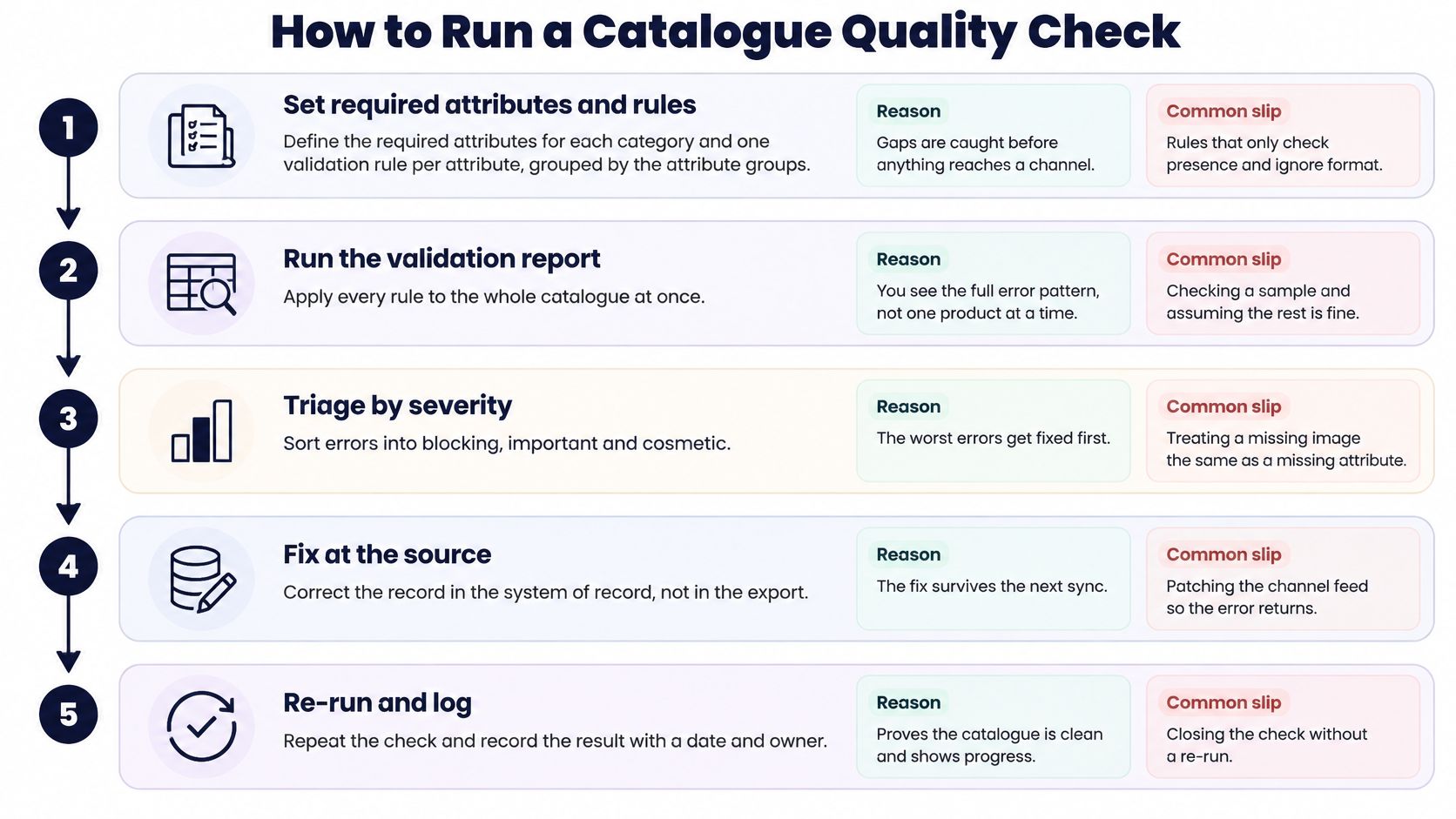
- Set the required attributes and one rule for each. Work from the attribute groups above rather than writing a second list. Each rule is a format (GTIN check digit), a controlled value list (materials, allergens), a range (weight within the bounds set for the category), or a relationship (every variant links to a parent). Rules catch gaps at the record, before a channel does. The common slip is a rule that checks a field is filled but not that it's well formed, so a value of "n/a" passes every test.
- Run the checks on every SKU at once. Apply completeness, validity, accuracy and consistency to the whole catalogue, per channel. Running the full report shows you the pattern of failure: which fields break most, and in which channel. The common slip is checking twenty products by hand, finding them fine, and assuming the rest are.
- Score each SKU against an 80% benchmark. Weight the attributes so a missing GTIN costs more than a missing SEO phrase. A GS1 India study of 510 SKUs across major marketplaces and direct-to-consumer stores found data-quality scores clustering around 90%, yet about 14% of SKUs fell below an 80% practical benchmark, and accuracy stayed below the benchmark for 23% of SKUs. An average hides the records that fail. The same GS1 framework standardises how attributes are captured, formatted and interpreted between trading partners, which is what keeps one catalogue consistent across a storefront, Google Shopping, marketplaces and customer-service tools.
- Route failing records to an approval queue. Anything under the threshold waits for a person. This is the gate that makes fast publishing safe, because the feed only carries records someone has cleared.
- Log issues per item, by channel and severity. Target treats issues per item as its primary data-quality metric and reduced the rate from 2.1 issues per item to 0.9, a reported 60% improvement, through a national programme of attribute audits (GS1 case study on driving product data quality by the numbers). One SKU can hold several independent failures at once: a wrong GTIN, a mismatched variant size, an obsolete image, a missing unit of measure. Counting defects, not just checking that a record exists, is what makes progress visible.
- Re-check after each fix and version the change. Re-run the report and store the result with a date and an owner. Versioning lets you restore an earlier price or translation when a correction turns out to be wrong, instead of retyping it from memory.
A healthy catalogue looks unremarkable: the issues-per-item count falls month over month, the approval queue stays short, and the same error doesn't reappear in a different channel. When those three things hold, the catalogue is being managed rather than maintained by apology.
Publishing Across Channels and Languages
Format conversion is daily work, not a quarterly project. One master record has to leave the system as a storefront page, a marketplace feed, a shopping listing, a PDF, a chat reply and a returns page, and each destination wants different field names, units and length limits.
The split that prevents chaos is field by field, not channel by channel. Some fields stay global because being right everywhere is the point: safety specifications, model identifiers, materials, allergen data, and the canonical dimensions. Others belong to the market: legal claims, sizing conventions, tax treatment, delivery eligibility, currency, and imagery that suits local expectations. Write the split down, because a rule nobody recorded is a rule someone will break next quarter.
Fallback beats blank fields. When a translation is missing, publish the source-language text with a clear label rather than an empty field. A blank spec looks like a defective product; a labelled one looks like a catalogue still being localised.
Reconciliation is the hard part. A regional team proposes an edit, the edit is checked against the canonical record, and it merges only if it doesn't contradict the source attribute. A local shipping weight can differ. A local material cannot. This is also where publishing and language work overlap: translated pages need to be findable, and multilingual website SEO explains how localized addresses and metadata get indexed, but the catalogue question stays narrower. Does the translated field agree with the attribute it came from?
The commercial cost of getting this wrong is documented. A 2025 industry summary of consumer research, cited in Shopify's guide to ecommerce catalogue management, reports that 54% of consumers abandoned carts because product information differed across websites, and 71% returned a product because its content was incorrect. Localization quality is judged by purchase confidence and post-purchase accuracy, not by translation completion.
A quick way to audit your own presentation is to walk a live index as a shopper would. Browsing browse all shop products shows how a catalogue reads when every listing has its own page and its own facts, and where a thin version page would stand out.
Before each channel goes live, confirm four things:
- Feed format: the field mapping, required fields and character limits for that channel, tested on a small batch first.
- Currency: the selling currency, tax display and rounding rules that apply in that market.
- Unit of measure: weight and dimensions expressed in units the channel and the carrier expect.
- Returns text: the policy shown on the listing matching the policy the customer will meet.
Using AI for Product Copy Without Losing Accuracy
A junior copywriter who never sees the product, works from an incomplete spec sheet, and writes fluently anyway is a useful warning for catalogue teams. Fluent text can hide missing facts. A confident sentence about battery life or fabric blend is harder to catch than a blank field, because it reads as finished work even when the record behind it is thin.
The pressure to use that copywriter is real. In ISG's 2025 Market Lens study, 32% of organisations named data quality, accuracy and consistency as a major AI challenge, second only to proving return on investment (ISG research on data quality for AI). Teams know the input data is the problem, and they're under pressure to ship the output anyway. That is why AI copy should be treated as a presentation layer over the product record, not as a way to fill gaps by guesswork.

The evaluation gap makes this harder to manage. Some teams judge AI copy through indirect signals, such as customer-satisfaction scores, instead of comparing the draft directly with the source attributes. A rising satisfaction score can hide a description that invented a certification and hasn't been returned yet. That is the catalogue equivalent of checking the packaging while ignoring the contents. The useful question is narrower: can every factual claim be traced back to a field in the record?
Controls that make AI copy auditable:
- Attribute-level source citations: every generated claim traces to a specific field in the record, so a reviewer can check the claim against the attribute instead of re-reading the whole page.
- Confidence scores and freshness dates: a draft built on an old specification is flagged, not published.
- Prohibited claims lists: regulated language around health, safety, origin and performance is blocked by rule, not left to a reviewer's memory.
- Human approval thresholds: the more a draft touches compliance or compatibility, the more review it needs before it reaches a channel.
- Contradiction tests across languages and channels: the same product described in two locales shouldn't disagree about weight, dimensions or materials.
Blocking AI from publishing is the correct call in three situations: a required attribute is missing, a specification can't be traced to a source, or the claim is regulated. In each case the fix belongs upstream in the record, and the copy is just where the problem becomes visible. CIQRA keeps that boundary clear. AI can draft product copy, SEO text, alt text, translations and llms.txt, while the store decides what goes live. The customer reviews and checks AI output before publishing it or relying on it.
Track the metrics separately, because they fail differently. Attribute completeness shows whether the record is ready. Factual error rate shows whether drafts are faithful. Update latency shows whether changes reach channels in time. Return-related complaints tied to product content show the commercial damage. Assisted-conversion rate shows whether better copy is helping shoppers decide. A practical guide to writing product descriptions treats the attribute layer as the source and the prose as the presentation of it.
More AI text on a weak record makes the catalogue worse, because it adds fluent, confident, unverifiable claims to data that was already incomplete. Fix the attributes first. Then let the drafting tools work.
Choose a Catalogue Setup for Your Business
Four setups cover most businesses, and the right one depends on how many products you hold, how many channels read them, and who signs off a change.
| Setup | Best fit | Main strength | Main limitation |
|---|---|---|---|
| Spreadsheet | Small catalogue on one channel | Low cost and flexible | No validation or audit trail |
| Commerce platform catalogue | Single store selling direct online | Catalogue, checkout and admin in one place | Limited governance across many brands |
| Product information management system | Multi-channel, multi-market brands | Central master record, validation and workflows | Higher cost and setup effort |
| Channel feed tools | Selling through a few marketplaces | Fast syndication to each channel | Each channel adds its own rules and gaps |
The decision criteria are practical rather than technical. Count your products, your live channels and your languages. Ask whether several brands or business accounts share one master record, and ask who approves a price change on a Friday afternoon. If the answer is "whoever is online", you need approval routing more than you need features.
A simple rule holds: a spreadsheet works while one person can check every row. Once two channels need the same data, move to a system with validation and version history, because the spreadsheet can no longer prove what changed.
One option for stores selling direct is CIQRA Commerce, where the catalogue, basket, checkout and admin sit in one place. Products can be imported from a spreadsheet (CSV) or from a supplier's XML feed, bulk edits can change prices and product fields across many products at once, and variants allow up to three options with 100 values each, with combinations generated automatically, each carrying its own SKU, price, stock and image. Those three capabilities cover the collect, enrich and maintain stages for a catalogue that has outgrown a single sheet.
Category structure decides how those variants read to a shopper. A tapware range is a useful test case: finishes, sizes and warranty terms multiply quickly, and every listing in the collection has to agree on the same attributes before filters and comparisons work. Looking through Tiles Mate tapware range shows how one category can hold dozens of closely related variants that all depend on the same attribute set.
Whatever you choose, make three decisions now: name an owner for each attribute group, set the first quality threshold, and run one month of issues-per-item tracking before you add another channel. That month of data tells you more about your catalogue than any feature comparison.
Three actions for this week:
- List your live channels and the format each one expects, then note which fields you remap by hand today.
- Count the required attributes for one category, not the whole catalogue, so the list is short enough to finish.
- Set one validation rule and apply it to every SKU in that category, starting with the GTIN check digit or the weight range.
CIQRA Commerce keeps the catalogue, basket, checkout and admin in one place, so the record you validate is the record your storefront and channel feeds publish. It supports spreadsheet and XML imports, bulk edits across many products, and variants with their own SKU, price, stock and image, along with catalogue feeds to Google and Meta. Start with CIQRA and give one category the full treatment this week: attributes, a rule for each, a threshold, and a named owner.