
You've bought the domain, built the site on a temporary address, and now you're staring at two different dashboards that both claim to control DNS. Your host says add a record. Your registrar shows records you don't recognize, including ones tied to your business email. That's the normal starting point for how to connect domain to website work, and it's also where most avoidable damage happens. The website part is usually two records. The risk is deleting the records that keep mail, verification, and subdomains alive while you add them.
Table of Contents
- The DNS Records That Connect a Domain
- Keep Email and Verification Records Working
- How to Point Your Domain at Your Website
- Verify the Connection and Fix Failed Lookups
- Fix Certificates and Redirects After Connecting
- Confirm the Connection and Lock Down Your Domain
The DNS Records That Connect a Domain
Connecting a domain means adding a few DNS records at the provider that answers for your domain, pointing them at the address or hostname your host gives you. Nothing moves. Your registrar, DNS provider, and website host can stay three separate services.
That separation is built into DNS itself. The Internet Engineering Task Force RFC 1034 was published in November 1987 and defines DNS as a hierarchical, distributed naming system that maps readable names to IP addresses. Each label in that tree can contain up to 63 octets.
Which Records Do Which Job
| Record | Points To | Use It For | Watch Out |
|---|---|---|---|
| A | An IPv4 address | The bare domain, such as example.com | Replace old hosting IPs instead of adding a second host |
| AAAA | An IPv6 address | The bare domain for IPv6 visitors | A stale AAAA record sends IPv6 visitors to the old server |
| CNAME | Another hostname | The www subdomain | Cannot coexist with other records on the same name |
| ALIAS or ANAME | A hostname | The bare domain when CNAME is not allowed at the root | Provider-specific, not a standard record type |
| TXT | A text value | Ownership verification and email authentication | Editing it carelessly can break SPF or DKIM |
| MX | A mail server hostname and priority | Inbound email | Leave it untouched when you only connect the website |
| NS | Nameserver hostnames | Choosing which DNS provider answers | Change it at the registrar, or your other records are ignored |
The usual pair is an A record for the bare domain and a CNAME for www pointing to your host's hostname. Add an AAAA record only if your host gives you an IPv6 address. If it doesn't, don't invent one and don't leave an old one in place.
The bare domain follows different rules from www because a CNAME can't share a name with other records. That's why some providers offer ALIAS or ANAME at the root instead. Those names aren't portable, so if you move DNS providers later, you'll need to translate that entry into whatever the new provider supports.
Your registrar's nameservers decide which panel counts. If the registrar points to provider A and you edit records at provider B, visitors will never see your changes. Copy the exact values from your host's dashboard on the day you do the work, not from a screenshot in an old tutorial.
Keep Email and Verification Records Working
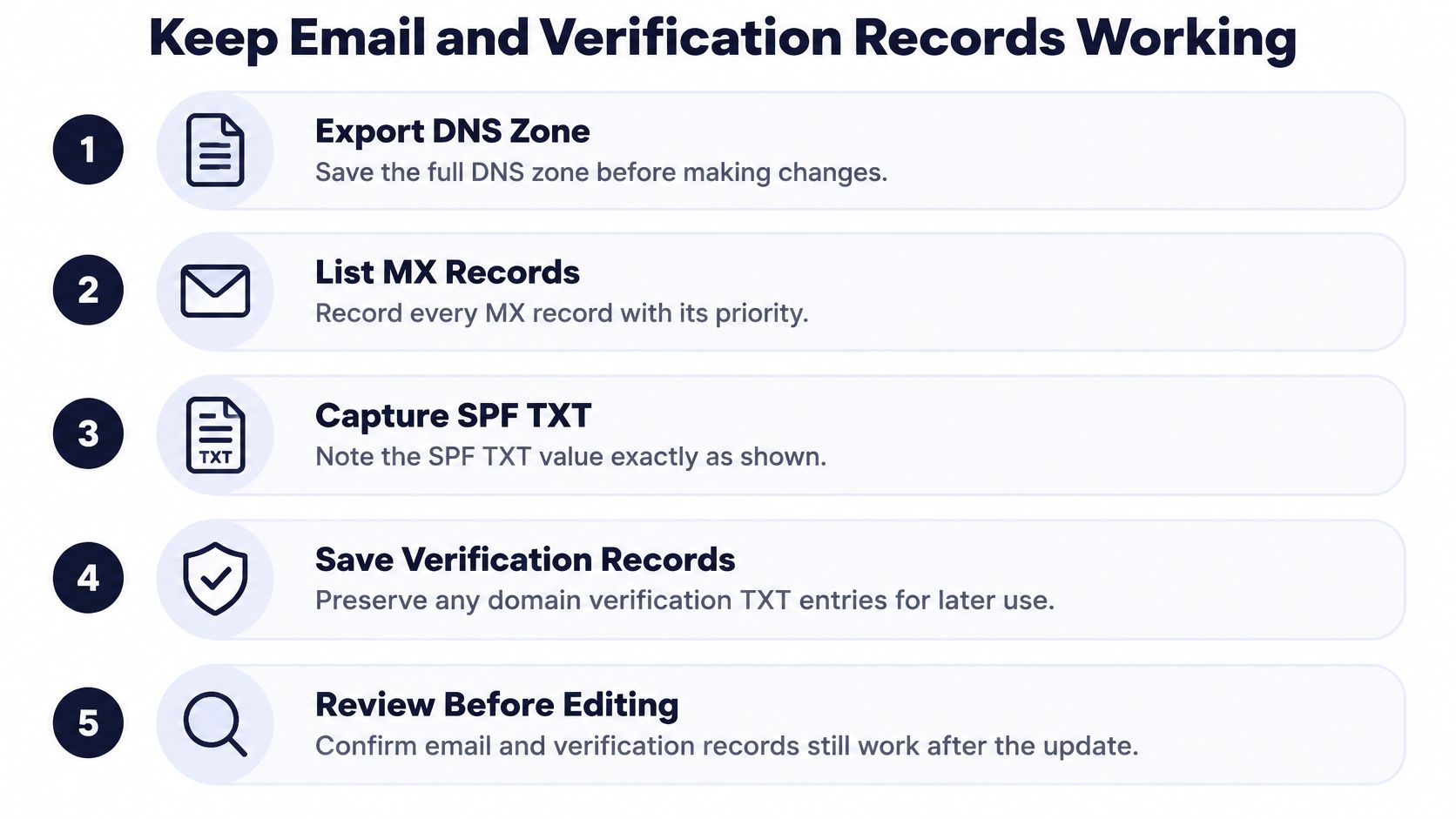
A working website doesn't prove a working domain. Say a bakery connects its new site on Friday, the homepage loads perfectly, and on Monday nobody has received a single order enquiry because inbound mail stopped when the nameservers changed. That failure is silent, which makes it worse than a visible website error.
Inventory Before You Edit Anything
Export or screenshot the full DNS zone first, then write down each record you intend to keep. I would put the values in a plain notes file, not just rely on screenshots you have to retype under pressure.
- MX records: Copy every mail server hostname with its priority number, in order.
- SPF record: Save the full TXT value exactly, including every included sender, because trimming it can push legitimate mail to spam.
- DKIM selectors: Note the selector names and whether each one is a CNAME or TXT record, since these often belong to your mail or newsletter provider.
- DMARC record: Record the TXT value at the _dmarc name.
- Verification strings: Keep TXT values for search consoles, ad accounts, and document tools, even if you no longer remember adding them.
- Other subdomains: List names such as mail, shop, or app that belong to separate services.
Migration guidance in the DCHost DNS TTL and server migration guide recommends copying MX, SPF, DKIM, DMARC, and other TXT records before changing DNS, then monitoring delivery after cutover. It also notes published guidance commonly estimates 24 to 48 hours for broad propagation.
Practical rule: If you can't explain what a record does, keep it. Deleting an unknown TXT record saves nothing and can break a service you'll only miss next month.
After the cutover, send a test message to a Gmail address and an Outlook address and reply from each one. Check the headers for SPF and DKIM passing, or run the values through an SPF and DKIM checker from MailGenius before you declare the job done. Lowering TTLs a day early can shorten the wait, but it won't restore a mail record you forgot to copy.
How to Point Your Domain at Your Website
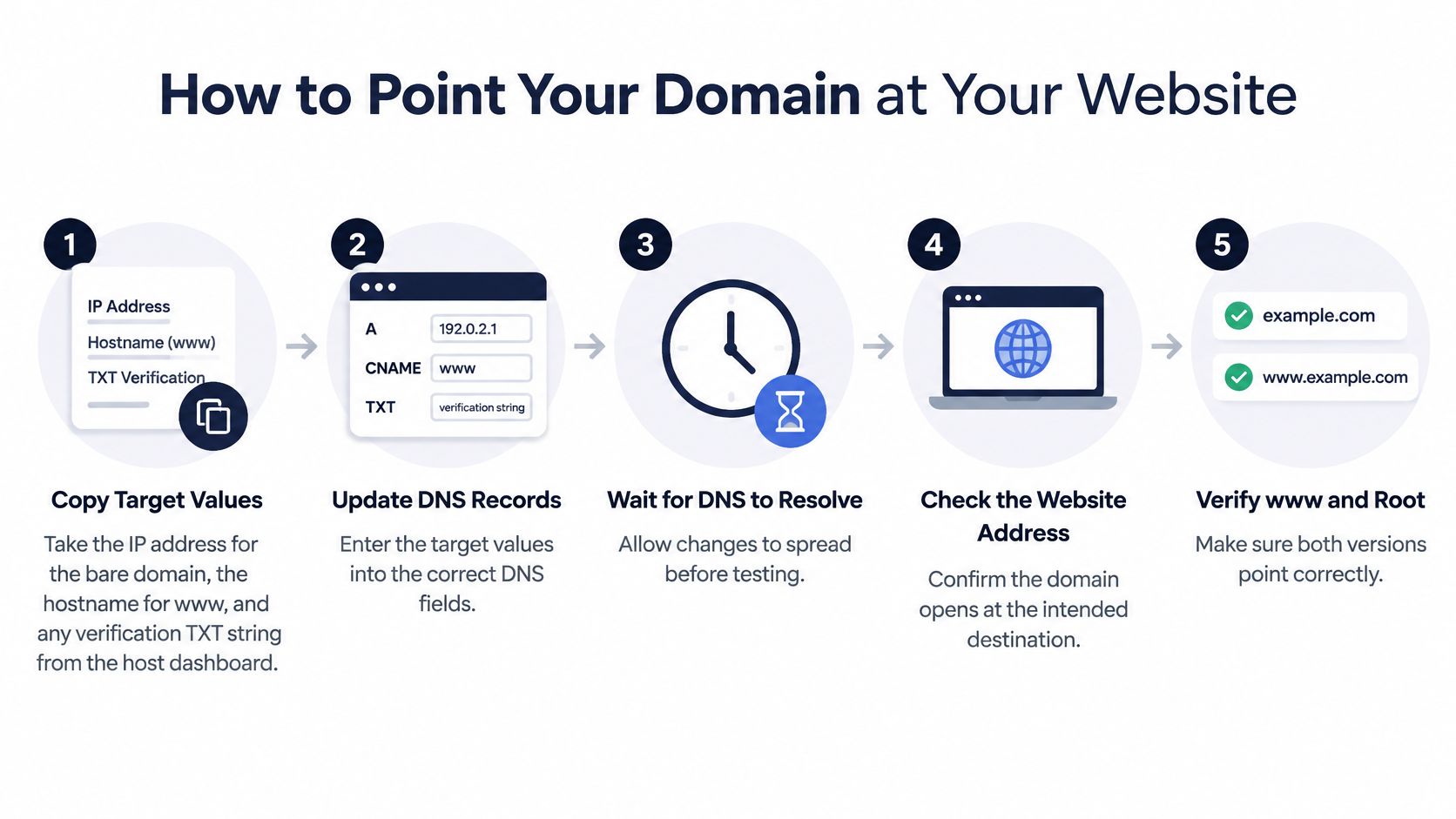
Work in this order and don't skip ahead to adding records. Most failed setups trace back to editing the wrong panel or pasting the wrong value format, not to DNS being slow.
The Edit in Order
- Copy the target values from your host. Take the IP address for the bare domain, the hostname for www, and any verification TXT string. Hosts change these values over time, so a guide written for another platform can point you at infrastructure that no longer serves your site.
- Find the DNS panel that answers. That might be your registrar or an external provider such as Cloudflare. Confirm the nameservers at the registrar match that provider before you type anything.
- Choose one canonical address and write it down. Pick either the bare domain or www as the address you'll print, link to, and submit to search engines. The other version will redirect to it later.
- Remove conflicts on the names you're changing. Delete a parked-page A record on the bare domain or an existing www entry that clashes with the CNAME you need. Leave the MX, SPF, DKIM, DMARC and verification TXT records exactly as they are; connecting a website should never touch mail.
- Add the website records. Enter the A or ALIAS record for the bare domain and the CNAME for www. Paste only the IP or hostname, never a full URL with https:// in front of it, since that single mistake produces an invalid record.
- Add the domain inside your host's dashboard. This tells the host to expect traffic for that name, verify that you control it, and start issuing the certificate. DNS pointing at a host that doesn't know your domain returns an error page, and the certificate can't finish until the name resolves.
- Note the TTL on the old records. That's your realistic wait before resolvers stop serving the previous answers. Tell stakeholders the window and resist editing again within it.
If someone else is making the change, hand over registrar access only to a person who can name your authoritative DNS provider and show you the pre-change record inventory, mail and verification entries included. Those two artefacts are your baseline if a record disappears during the edit. Teams weighing outside help can apply the same test when selecting IT support in the North West or wherever their provider is based.
What Good Looks Like
Your panel should show exactly one answer per website name, matching your host's values, with no stray record competing on the same hostname and every mail and verification record untouched. On CIQRA, you connect a domain you already own and the SSL certificate is issued and renewed automatically on every plan, which is the pattern to look for on any hosted service. If you're weighing that kind of setup against self-managed software, our explainer on what a SaaS CMS is covers where hosting and updates sit.
Don't announce the new address yet. Saving the records publishes the change, but resolvers still need the TTL window to catch up and the certificate finishes only once the name answers.
Verify the Connection and Fix Failed Lookups
Start with the nameserver check, because it catches the most common error in minutes. A perfect record stored at a provider your registrar doesn't delegate to is invisible to everyone. If that row is wrong, stop and fix the delegation at the registrar before touching anything else.
Checks to Run in Layers
| Check | How to Run It | Expected Result | If It Fails |
|---|---|---|---|
| Bare domain IPv4 | dig example.com A | Your host's IPv4 address | Old IP returned, check nameservers, then wait out the TTL |
| Bare domain IPv6 | dig example.com AAAA | Your host's IPv6 address, or no answer | Old AAAA record, delete it |
| www hostname | dig www.example.com CNAME | The hostname your host supplied | Missing or clashing record, fix the www entry |
| Nameservers | dig example.com NS | Your DNS provider's nameservers | Registrar points elsewhere, update it at the registrar |
| Negative answer | dig example.com A after adding the record | A correct answer | NXDOMAIN lingering, wait out the SOA MINIMUM period |
| Browser test | Open http and https versions of both hostnames | One canonical address with a valid certificate | Certificate or redirect error, see the next section |
The Cloudflare DNS troubleshooting guide explains that recursive resolvers may retain a negative response for a hostname that previously returned NXDOMAIN, and that the expiration interval is governed by the zone SOA record's MINIMUM value rather than the new record's TTL. Lowering TTLs before a planned cutover helps, but it cannot accelerate an already cached negative answer.
That distinction explains results that look contradictory. Your office network may show the new site while a customer in another country still gets nothing, because their resolver asked earlier and cached the empty answer. Editing the record a second time doesn't clear that cache. Waiting does.
Watch the AAAA row even if you never think about IPv6. An old AAAA record pointing at your previous host means IPv6-capable visitors reach the wrong destination while your IPv4 test passes cleanly. If your new host hasn't given you an IPv6 address, the correct result is no answer at all.
Flushing your own browser or laptop cache proves nothing about the rest of the internet.
Test from at least two networks, such as office Wi-Fi and a phone on mobile data, then use an online checker that queries several locations. Teams that hand sites over to clients often formalize these DNS checks before handing off client sites so the same mistakes don't recur on every launch. Only call the connection finished when every lookup and both browser tests agree.
Fix Certificates and Redirects After Connecting
DNS resolving correctly gets visitors to a server. It doesn't get them a secure page at one consistent address, and that second job fails in predictable ways.
Certificate First, Then Redirects
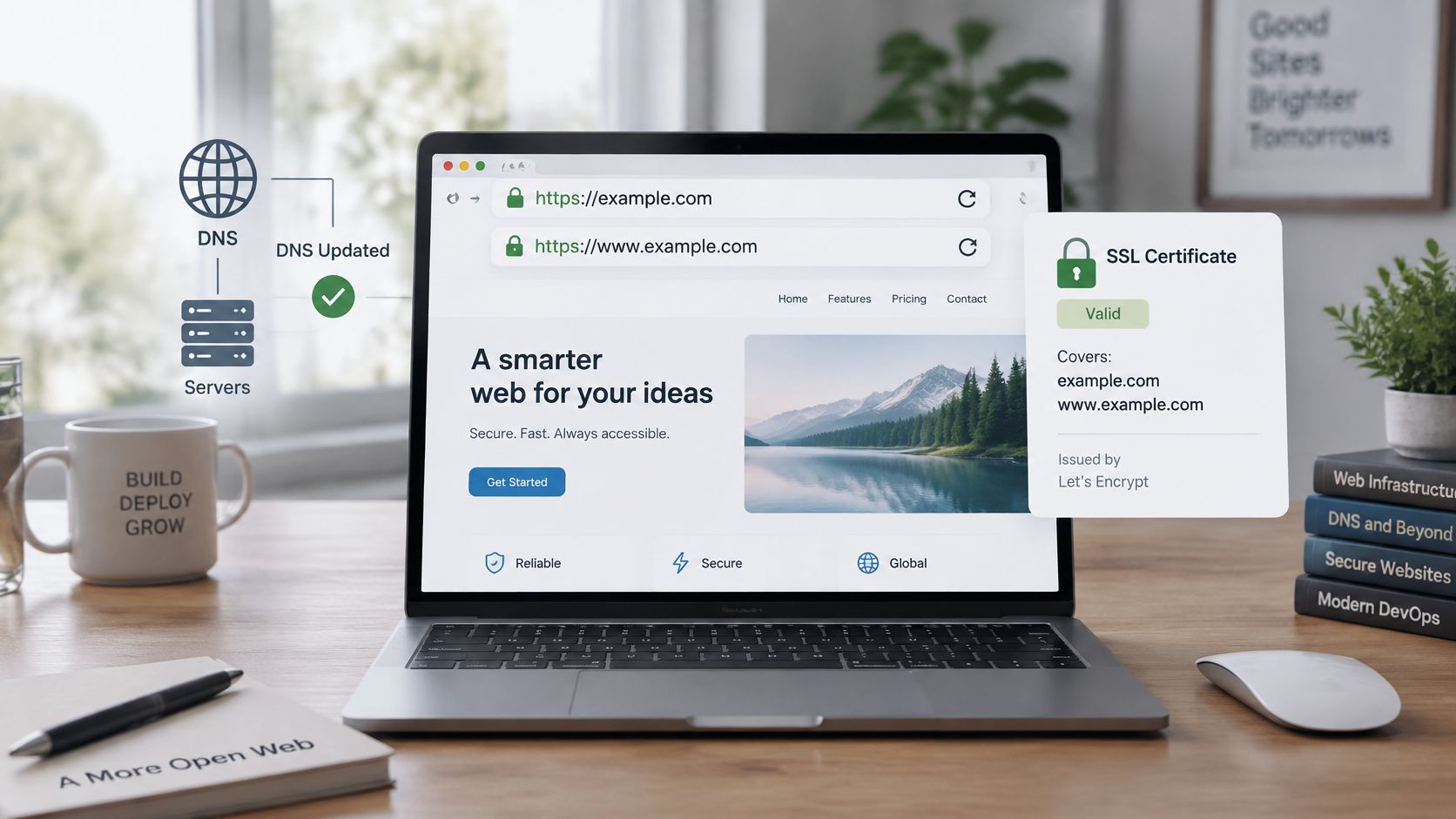
Confirm the TLS certificate covers both the bare domain and www. A certificate issued only for www triggers a browser warning on the bare domain, which visitors read as the site being unsafe. Most hosts issue automatically after verification, so check the status in the dashboard before assuming something is broken, and recheck after DNS settles if issuance was attempted too early.
Next, test all four variants by typing each one into a private browser window. Send the three noncanonical versions straight to the final URL in one 301 or 308 redirect. A chain that bounces from http to https, then from www to the bare domain, wastes a hop at every visit.
Google's site move guidance advises avoiding redirect chains, although Googlebot can follow up to 10 hops, and recommends maintaining migration redirects for at least 180 days and longer when search traffic still reaches the old URLs. Build a URL map when you're replacing a domain, so each old page lands on its new equivalent instead of dumping every visitor on the homepage.
- Redirect loop: Usually a proxy or CDN setting disagrees with the host about whether the origin connection is already HTTPS.
- Mixed content warnings: The page is secure but still loads an image, script, or form endpoint over plain http.
- Third-party services on the old hostname: Payment callbacks, form handlers, and tracking tags keep posting to an address you no longer control.
Update canonical tags, sitemap URLs, and robots.txt to the address you chose, because conflicting signals slow down how search engines settle on one version. If this connection is part of a bigger store move, our ecommerce replatforming SEO checklist covers the catalogue and URL side of the same job. Finish by submitting a contact form and completing a test checkout on the canonical address, not on the temporary one.
Confirm the Connection and Lock Down Your Domain
Sign off on three things separately, because each can pass while another fails. The website should load over HTTPS on a phone and a laptop, with every variant landing on one URL. A contact form should deliver its message, and a test email should arrive with SPF and DKIM passing.
Then protect the account that controls all of it. Turn on multi-factor authentication at the registrar, enable transfer lock where it's offered, and switch on auto-renewal with a billing contact who reads the notices. An expired domain takes the website and email down together, and recovery after expiry is slower and more expensive than any DNS wait.
What HTTPS Does Not Protect
The padlock only secures traffic after a visitor reaches the right server. It doesn't authenticate your DNS answers or stop someone with your registrar password from repointing the domain. Our piece on security as a feature explores why that distinction matters to buyers as well as operators.
2025 reporting in an Openprovider analysis of DNSSEC adoption put DNSSEC at roughly 4% of generic top-level domains and 13% of country-code domains, while SSL certificates covered more than 60% of domains across TLD types. Encryption is mainstream. Authenticated DNS isn't, which is why you have to ask for it rather than assume it's on.
Ask your registrar and DNS provider whether DNSSEC is supported across both, and enable it only when the full chain supports it. A half-configured setup can make your domain unreachable for validating resolvers, which is a worse outcome than leaving it off until you're ready. Record who can change DNS, remove old staff and former agencies, and store the recovery codes somewhere your business can reach if one person is away.
A valid HTTPS certificate does not secure the domain by itself. Control of the registrar account does.
If you'd rather not juggle a registrar panel, a hosting panel, and a separate certificate process, CIQRA lets you connect a domain you already own to a CIQRA Sites website or a CIQRA Commerce store, with SSL certificates issued and renewed automatically on every plan and old links kept working through bulk redirect import. Start on your temporary address, connect the domain when the records above are ready, and request a demo if you want to see your own site previewed on the platform first.